Fifteen capabilities.
Not fifteen tools.
Most platforms give you a drawer of features and leave the wiring to you. The Engineering Pipeline is different: every capability exists to hand the next one something real. Here's the whole map — and what each part actually does.
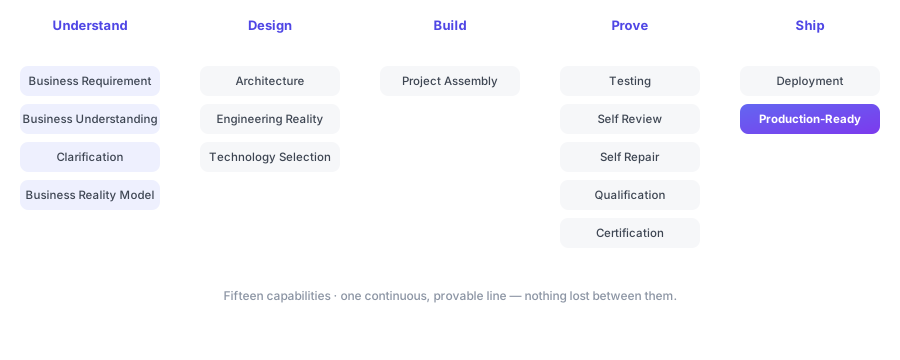
Understand
make sure we're building the right thingBusiness Requirement
You describe what your business needs in your own words — no forms, no spec template, no jargon.
Business Understanding
The Pipeline reads that intent and reasons about what your business actually does, not just what you literally typed.
Clarification
Where something is ambiguous, it asks a focused question — the way a senior engineer would — instead of quietly guessing.
Business Reality Model
It draws a plain-language blueprint of your business — the people, things and rules your software will handle — and confirms it with you.
Design
decide the shape on purposeArchitecture
It designs how the pieces fit together — a deliberate structure where every part has a reason you can question.
Engineering Reality
It grounds the design in what it actually takes to build — no hand-waving between "the plan" and "the work."
Technology Selection
It chooses the right technology for the job and stays provider-neutral, so you're never trapped in one vendor's way of doing things.
Build
make it wholeProject Assembly
It assembles the entire application into one working piece of software — following its own design, not scattering snippets for you to wire together.
Prove
earn your trust before you spend itTesting
It exercises the software to confirm it actually does what your business needs — evidence, not hope.
Self Review
It reviews its own work the way a senior engineer would, surfacing issues before you ever see them.
Self Repair
When it finds a problem, it fixes it — then re-checks. The loop runs until the result is clean.
Qualification
It checks the finished result against the standard it was meant to meet — the final exam.
Certification
It issues a clear, defensible stamp that the software is genuinely ready, and records it.
Ship
hand it over with proofDeployment Rolling out
It prepares the finished software to go live where people can use it — closing the gap between "done" and "running."
Production-Ready Software + Passport
You receive software that's ready for the real world, and an Engineering Passport recording exactly how it was built.
Each capability is accountable to the next.
A feature list is a pile of parts. This is a chain. "Understand" doesn't just exist — it produces a blueprint that "Design" must honour. "Prove" doesn't just run tests — it feeds real failures to "Self Repair," which re-checks until the result is clean. Nothing is a dead end; every capability hands the next one something concrete, and the whole chain is recorded in the Passport. That accountability is the feature. The fifteen boxes are just how it's organised.
See the capabilities work on your real need.
Bring one thing your business needs. We'll run it through the whole chain.